Datacenters
- Applications must scale
- Network: 100-400 Gbit/s → packet can arrive every ~120ns
- Storage: high-speed flash, NVM
- Must minimize overheads
- system call above 120ns, if we’re trying to trap for every packet, it’s too expensive
- Kernel is too expensive → kernel bypass
Low latency networking
⚠ Switch to EXCALIDRAW VIEW in the MORE OPTIONS menu of this document. ⚠ You can decompress Drawing data with the command palette: ‘Decompress current Excalidraw file’. For more info check in plugin settings under ‘Saving’
Excalidraw Data
Text Elements
App
App
…
User
Kernel
OS
NIC
send()
recv()
Monolithic OS with POSIX API
App
Library
User
Kernel
OS
NIC
DRAM
Kernel Bypass (LibOS)
recv()
dataplane vs. control plane
Sending and receiving packets (Optimize this part!!!)
Management
Link to original
- Kernel is too expensive → kernel bypass
- system call above 120ns, if we’re trying to trap for every packet, it’s too expensive
Challenge: isolation between apps
If we kernel bypass, how can we still provide isolation between apps In modern NIC hardware:
- virtual queues
- Application can only interact with this one queue, to isolate network traffic, up to NIC to dispatch appropriate traffic to queue
- IOMMU (input-output memory management unit)
- NIC can access specific region shared in memory but not anywhere else
- Memory isolation
- allows NICs to use virtual addresses
IX
4 Challenges
- protection
- isolate between apps
- isolation for network stack
- microsecond tail latency
- large fanout
- once request end up in datacenter, mass amount of servers are required to respond to request
- tail latency (99%) - how long for 99% packet to complete
- large fanout
- high packet rates
- often very small packets
- resource efficiency
- adjust amount of resources used by each application
- previous kernel bypass machines that allocated all resources to one application IX goal is to determine how to address all four challenges at the same time
IX overview
The previous libOS approach doesn’t provide protection required.
IX uses hardware support for virtualization for protection
Run to completion with adaptive batching
- Run to completion - process a packet from start to finish
- avoid intermediate layers of queuing
- don’t have to worry it’s going to get swapped out or dropped at intermediate queue
- Adaptive batching
- system is not waiting around for more to arrive
- If there’s a high rate, system batches them for better efficiency
- batch size varies dynamically
IX network flow
⚠ Switch to EXCALIDRAW VIEW in the MORE OPTIONS menu of this document. ⚠ You can decompress Drawing data with the command palette: ‘Decompress current Excalidraw file’. For more info check in plugin settings under ‘Saving’
Excalidraw Data
Text Elements
App / libix
dataplane
NIC Queue
TCP/IP
Event Conditions
APP
libIX
Batched syscalls
TCP/IP timers
NIC Queue
Link to original
Synchronization - free processing
- partition resources across cores
- separate per-core NIC queues
- RSS (Receive-Side Scaling) - distributes packets across cores
- Takes hash of packet metadata (src, dest) to assign to cores based on connection
- RSS (Receive-Side Scaling) - distributes packets across cores
Zero Copy
- POSIX - involves copies
- Zero copy - NIC writes packets to app-accessible memory
Evaluation
- Looked primarily at throughput and latency
- Compared to Linux, IX beats them at both low loads and high loads
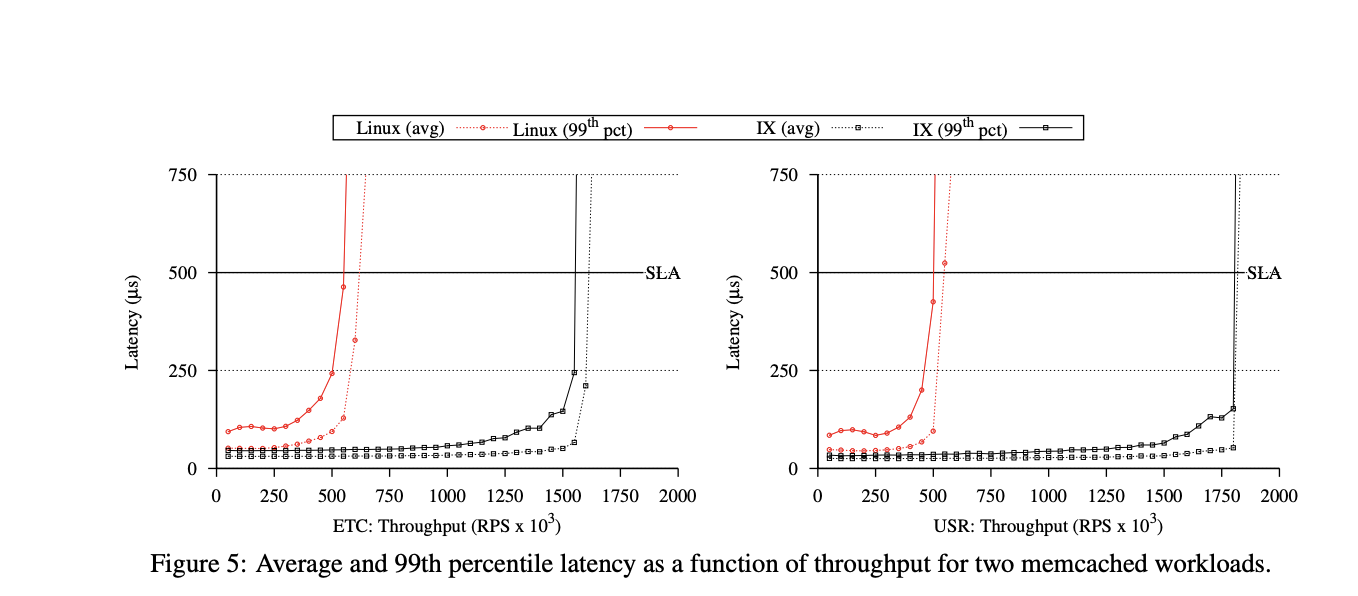
- Avoids interrupt overheads
- more efficient overall (zero copy and adaptive batching)
Summary of IX
- Protected dataplane using virtualization
- run-to-completion, batching, RSS, zero copy
Snap
Goals
- easier deployment by moving network stack out of kernel
- 1 to 2 months to deploy new kernel
- deployment was slow
- 1 to 2 months to deploy new kernel
- easier development at user level
- more optimization
- move network stack to user level
Snap
⚠ Switch to EXCALIDRAW VIEW in the MORE OPTIONS menu of this document. ⚠ You can decompress Drawing data with the command palette: ‘Decompress current Excalidraw file’. For more info check in plugin settings under ‘Saving’
Excalidraw Data
Text Elements
User
Kernel
Network module
OS
Microkernel
APP
APP
Queues
NIC
Link to original
- move network stack to user level
- Note: network module and NIC not linked together in contrast to IX
| LibOS (Exokernel) | Snap (Microkernel) |
|---|---|
| Pro: tailored network stack for specific use case | Pro: centralized management, control of scheduling |
| Pro: better latency, application and network model not separated | Pro: ease of deployment, modular |
| Pro: better isolation, not sharing network module | Con: potentially higher overhead |
| Pro: decouples scheduling of apps from network stack |
Threading - Kernel-level threads
- Don’t have to modify application that much to use snap, no “new” user level threading
IPC - communication between apps and Snap
- run apps and snap on different cores so there isn’t a lot of interrupts involved
- no need to context switch between one core
Separation of control and dataplane
CPU Scheduling
data plane are split into engines
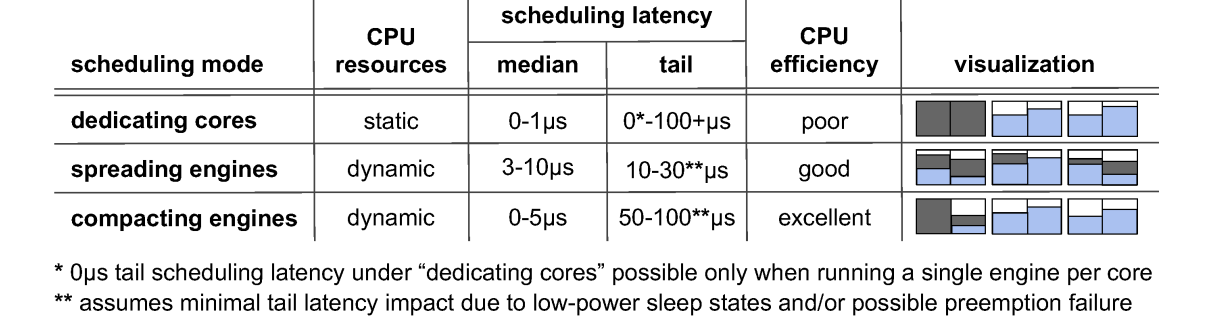
snap-dedicating cores
⚠ Switch to EXCALIDRAW VIEW in the MORE OPTIONS menu of this document. ⚠ You can decompress Drawing data with the command palette: ‘Decompress current Excalidraw file’. For more info check in plugin settings under ‘Saving’
Excalidraw Data
Text Elements
Apps
N
Dedicating cores
Spreading Cores
Apps
Compacting cores
Apps
Link to original
- Best efficiency?
- compacting
- Best tail latency?
- spreading latency, get efficient time to run
- dedicating cores
Transparent Upgrades
- Migrate engines one at a time
- Steps
- Start up new snap
- For each engine:
- write old snap state to memory (brownout period)
- new snap reads in state (brownout period)
- stop execution on old snap (blackout period)
- transfer any modified state (blackout period)
- restart engine on new snap (blackout period ~250 ms)
- Kill old snap
Snap summary
- microkernel-based design - easier to upgrade and deploy
- scheduling modes for engines
- used widely within google