Question
Q: What are the key tradeoffs between hardware virtualization and OS-level virtualization?
- Hardware virtualization - higher performance, but less flexibility
- likely a fixed set of OS with little sharing
- OS-level virtualization - lower performance, but more flexibility
- more OS support, has more hacky ways to sharing, also lower size (weight of VM)
Abstract
Hypervisors are cool, but some scenarios require system virtualization with high degrees of both isolation and efficiency.
- Presents container-based systems, a combination of resource containers and security containers applied to general-purpose, time-shared operating systems.
Background
- User apps share objects with other apps
- In contrast, hypervisors strive for full isolation between virtual machines
- Full isolation is good security
- But when each VM is running the same kernel and similar OS distributions, the degree of isolation offered by the hypervisors comes at the cost of the efficiency relative to running all applications on a single kernel
- Not as efficient use of resources
- New virtualization approach
- Aimed to enforce high isolation between VMs
- While maintaining efficient use of system resources
- Contributions
- Description of techniques used by Linux-VServer (VServer)
- a container based-system
- Contrast the architecture of VServer with Xen
- Description of techniques used by Linux-VServer (VServer)
Design Goals of VServer
- Reduce the overall resource usage wherever possible
Motivation
- Hosting orgs tend to run many copies of the same server software, sensitive to efficiency to reduce cost per customer VM
- COS virtualization (container OS)
- some real-world scenarios where it’s acceptable to trade isolation for efficiency
- Key requirement: Need complete fault isolations
- Xen is small, but still requires a host VM that authorizes and multiplexes access to devices
- hypervisors → narrow interface
- COS → wide system call ABI
- Key requirement: need sophisticated resource schedulers to avoid or minimize crosstalk (for resource isolation)
- Key requirement: Security isolation
- configuration independence
- global names by one VM doesn’t conflict with another VM
- safety
- global namespaces are not shared
- context/namespace
- configuration independence
- COSs rely on a single underlying kernel image
Container-Based OS Approach
Overview
Container-based system provides a shared, virtualized OS image consisting of:
- root file system
- Safely shared set of system libraries and executables
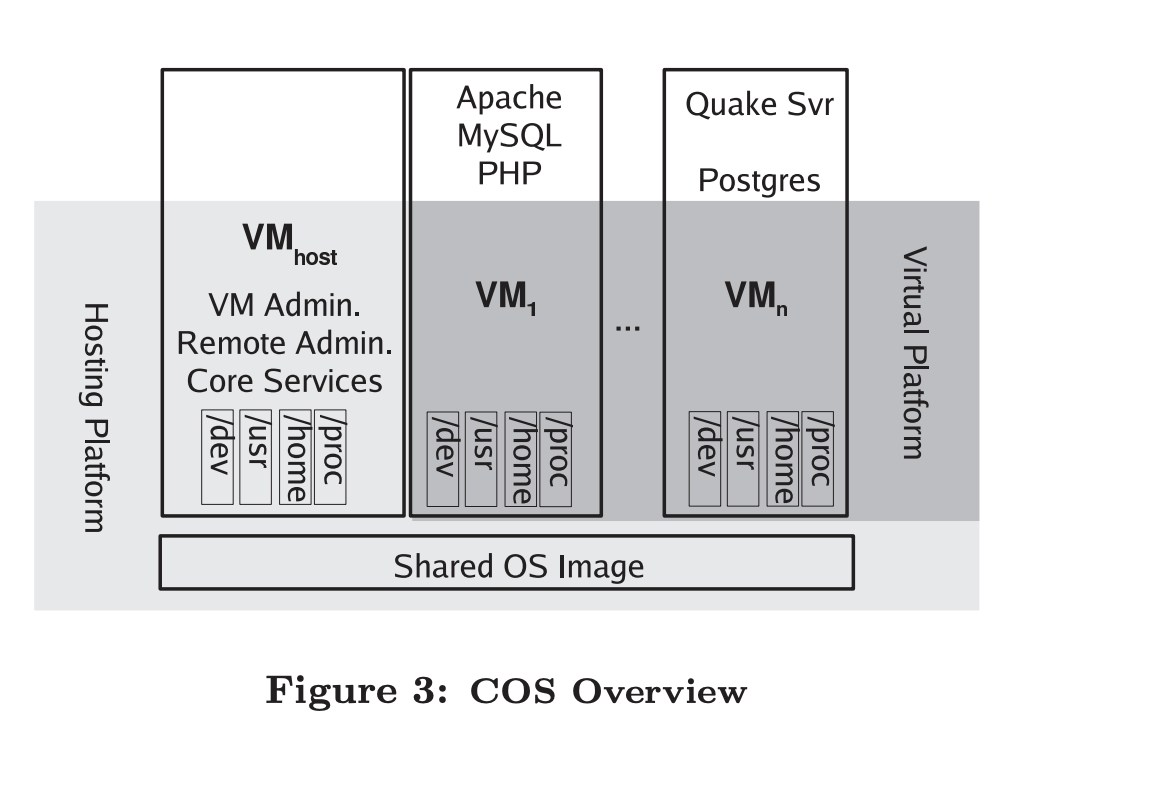 Basic techniques used to securely use these objects involves
 - Separation of name spaces (contexts)
- access controls (filters) Three basic platform groupings
- Hosting platform
- shared OS image
- privileged host VM
- Virtual platform
- view seen by guest VMs
- Applications running in the guest VMs
- little difference between container and hypervisor based system
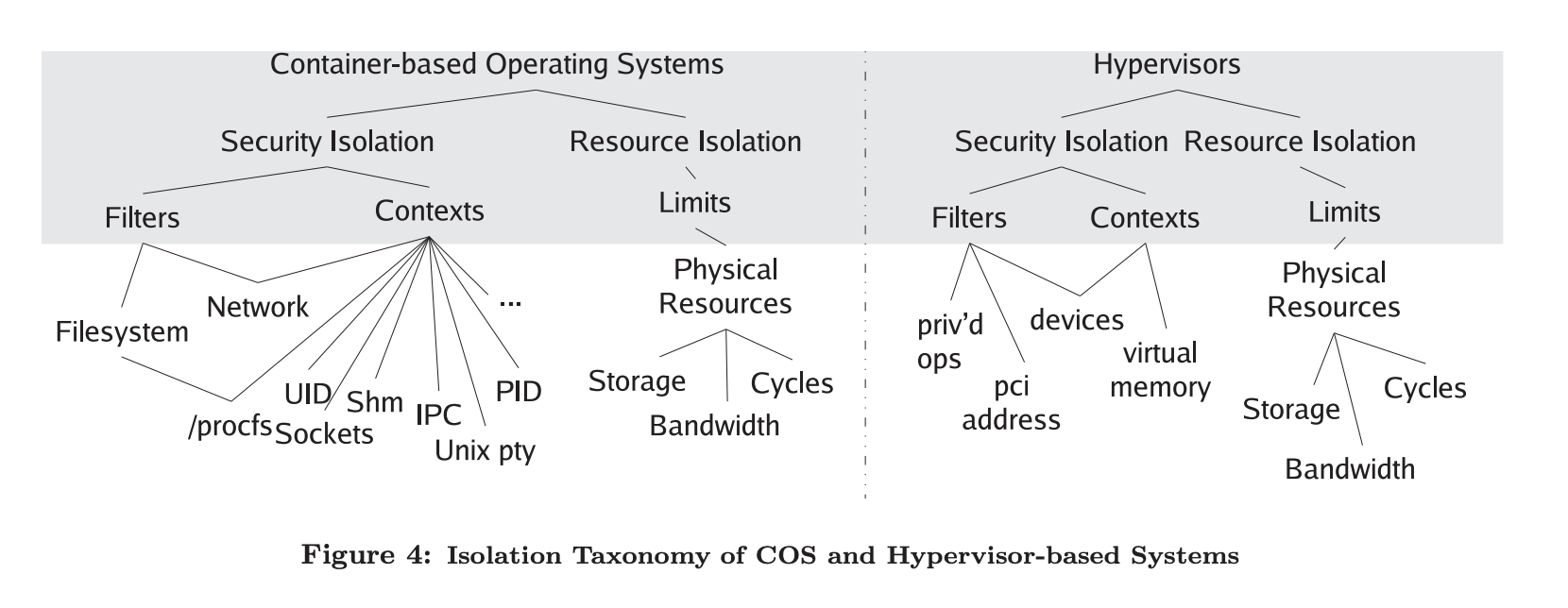
- little difference between container and hypervisor based system
resource isolation techniques
- both COS and hypervisor need to multiplex physical resources
CPU
- VServer implements CPU isolation by overlaying a token bucket filter (TBF) on top of the standard O(1) Linux CPU scheduler
- Each VM has a token bucket that accumulates tokens at a specified rate
- A VM that runs out of tokens has its processes removed from the running queue until its bucket accumulates a minimum amount of tokens
- rate changes depending on if VM has a reservation or a share
- reservation - accumulates at its reserved rate, a percentage
- share - a VM that has runnable processes will be scheduled before the idle task is scheduled and only when all VMs with reservations have been honored.
I/O
- I/O QoS: Fair share and Reservations
- VServer uses the Hierarchical Token Bucket (HTB), queuing discipline of the Linux Traffic Control facility (tc), is used to provide network bandwidth reservations and fair service
- Each VM, a token bucket is created with reserved rate and a share
- reserved rate - indicates the amount of outgoing bandwidth dedicated to that VM
- share - how VM shares bandwidth beyond its reservation
Storage
- Storage Limits
- VServer provides ability to associate limits to mem and disk storage
- For disk:
- max disk blocks
- max inodes allocations
- For mem
- maximum resident set size (RSS)
- # of anonymous memory pages (ANON)
- number of pages that may be pinned into memory (MEMLOCK)
VServer Security Isolation
- VServer resuses the global PID space across all VMs
- bad model but in paper it currently uses it
- Filters processes in order to hide all processes outside a VM’s scope
- Requires extension of existing kernel data structures for:
- Processes to become aware to which VM they belong to
- Processes to differentiate between identical UIDs used by different VMs
- Requires extension of existing kernel data structures for:
- All processes belong to a default host VM, however, to allow for a global process view, V server defines a special spectator VM that can peek at all processes at once
- Process migration for VMs on the same host is just chaning the VM association and per-VM resource statistics
The Chroot Barrier
The major problem with the chroot() system in Linux is that the information is volatile and will be changed on the “next” chroot() syscall
- chroot - changes root directory for process and its children
Options:
- Create or open a file and retain the file-descriptor, then chroot into a subdirectory at equal or lower level with regards to the file. This causes the ’root’ to be moved ’down’ in the filesystem.
- Use fchdir() on the file descriptor to escape from that ’new’ root. This will consequently escape from the ’old’ root as well, as this was lost in the last chroot() system call.
VServer FS Unification
- Implements a simple disk space saving technique
- files common to more than one VM (which are rarely going to change like libraries) can be hard linked on a shared file system
- issue - malicious VMs can (un)intentially destroy or modify such shared files
- Approach by VServer is to mark the files as copy-on-write
- When VM attempts to mutate a hard linked file with a CoW attribute set, VServer will give the VM a private copy of the file