“Brain and Limbs” Analogy
- LLM - the brain
- complex reasoning
- understand user intent
How Do Models Call Tools
- LLMs don’t execute tools directly
- LLMs “learn” to generate tool call syntax
- A system orchestration layer intercept and execute the tool
- Three primary methods for LLMs to know about tools
- Instruction Tuning (Fine-Tuning)
- System Prompt (e.g. ReAct)
- In-Context Learning (Few-Shot)
Instruction Tuning
- An LLM explicitly fine-tuned on a dataset of (Instruction, Tool Call, Tool Output, Final Answer)
- Early works (2023):
- Toolformer
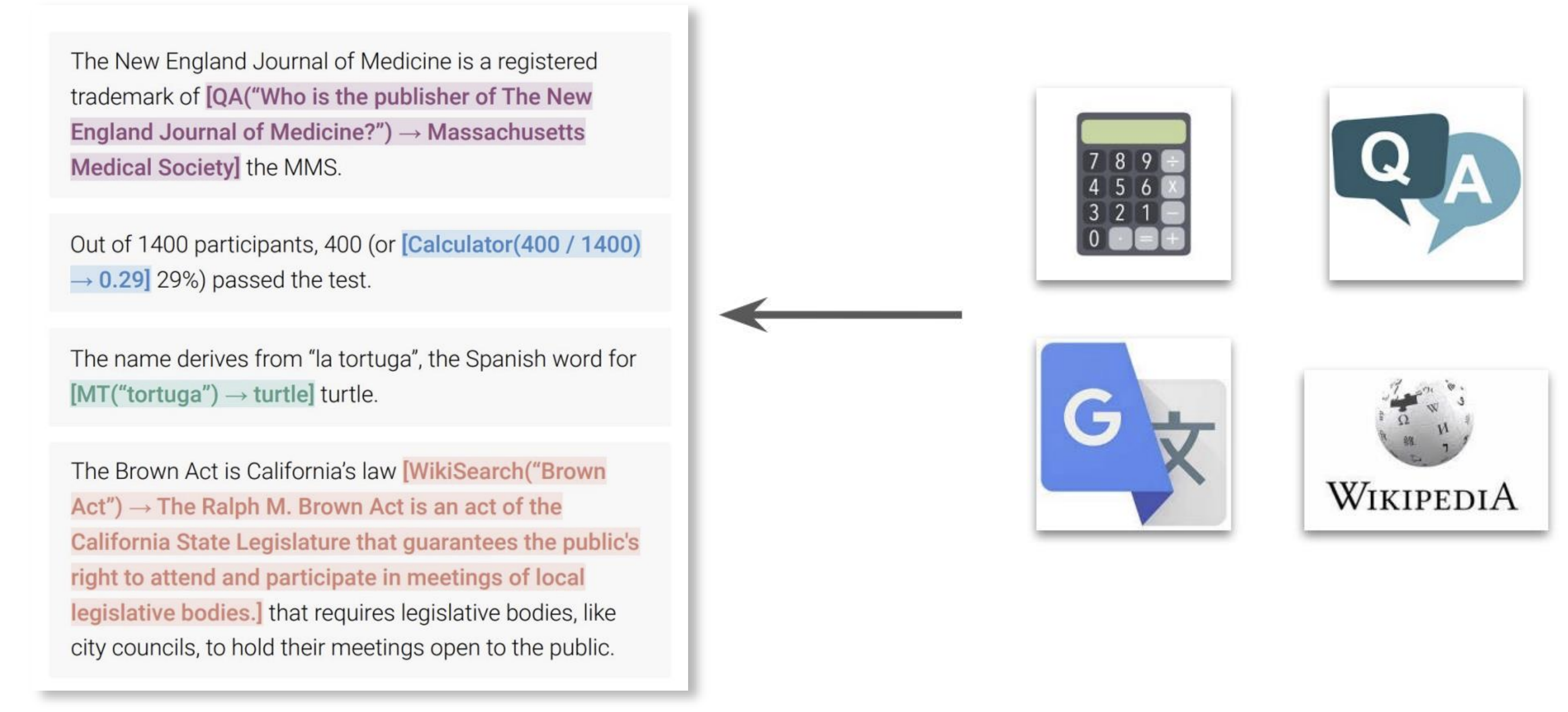
- TALM
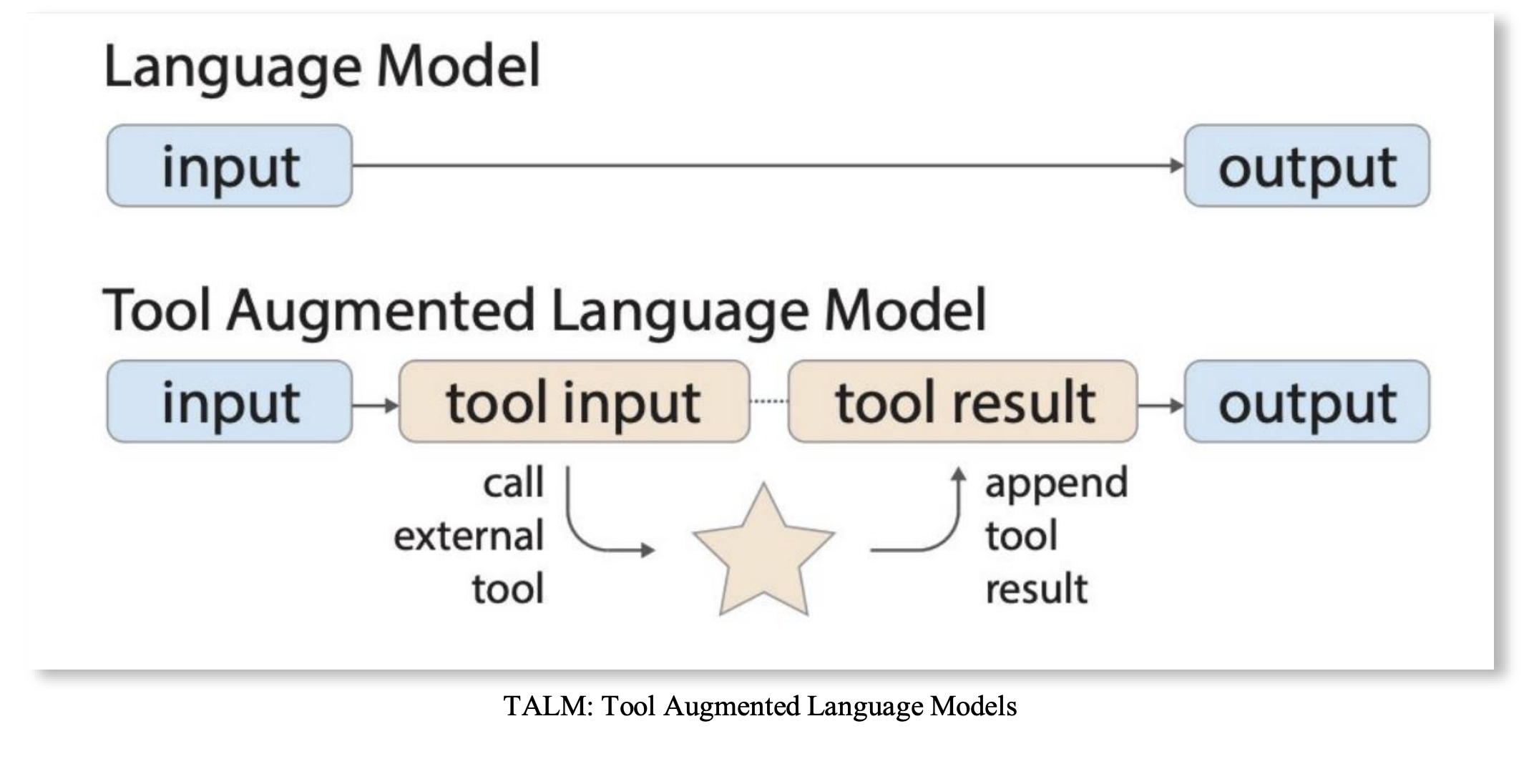
- Toolformer
- Early works (2023):
- Fine-tuned to recognized when an instruction requires a tool and to emit the exact syntax
- At inference time, no need for extra info to LLM,
- Knowledge of tool use baked into model weights
- Pro: Very fast and reliable for known tools.
- Con: Not flexible; cannot easily add new tools without re-tuning.
- This is early work, not scalable with new tools
System Prompt
System prompt instructs LLM to call tools
- eg. ReAct loop
Reason: LLM thinks step-by-step about what it needs. Tool Call: LLM decides to call a tool and generates the tool call syntax. Tool Execution: Outside the LLM, execute the tool, get result, and feed back to LLM Repeats this loop until it has enough information to answer the user.
- Pro: Flexible; new tools can be added just by describing them in the prompt
- Cons: Can be less reliable than fine-tuning; agent can get “stuck in a loop”, making errors or inducing many LLM calls.
Not as fast as fine-tuned, less reliable but more flexible
In-Context Learning
Provide a few examples (few-shot prompting)
- User:
-
What's the weather in SF? Model: weather('SF') System: {"temp": 65} Model: The weather in SF is 65. --- (New query) --- User: What about Seoul? - Model:
<toolcall>weather(‘Seoul')</toolcall>Pros: Flexible; new tools can be added just by describing them in the prompt Cons: Longer context, can be less reliable than fine-tuning, needs good examples
Common Agent Use Cases
- Data Science: Writing and executing Python code to analyze data, plot charts, and check statistical results.
- Search & Retrieval: Answering questions with up-to-date information by fetching and summarizing web content.
- Productivity : Managing calendars, drafting emails, and summarizing documents.
- DevOps: Reading logs, diagnosing errors, suggesting code fixes, or managing cloud infrastructure via CLI tools.
- Creative Work: Generating images with tools like DALL-E, or composing music snippets via a MIDI API.
Agent Tooling Challenges
Standardization
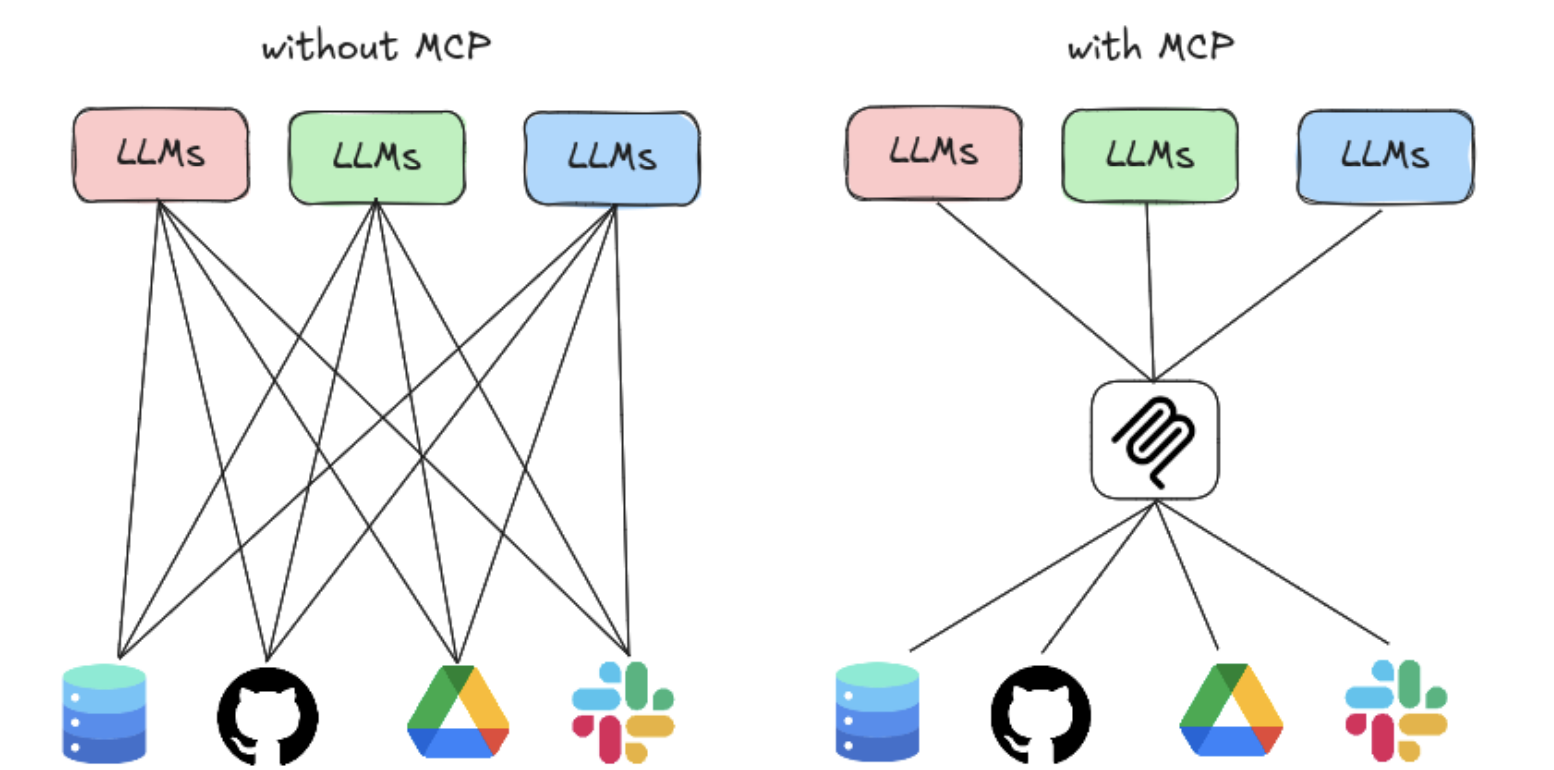
- The Problem: An “N x M” integration nightmare.
- N Models: (GPT-4, Claude 3, Gemini, Llama 3…) all have different finetuning data and preferred tool-call syntax.
- M Tools: (Google, Stripe, Slack, JIRA, internal APIs…) all have different authentication, schemas, and endpoints.
- The Result: Developers must write custom, brittle “glue code” for every single model-tool combination. This is not scalable.
The Solution - MCP (model context protocol)
- Connecting (N) LLMs to (M) external tools/resources used to be a NxM problem
- MCP standardizes the LLM-tool communication into a N→1→M process
- Build with a client-server model
- MCP client: the agent that needs to call tool/data
- MCP server: a service to expose external tools and data sources
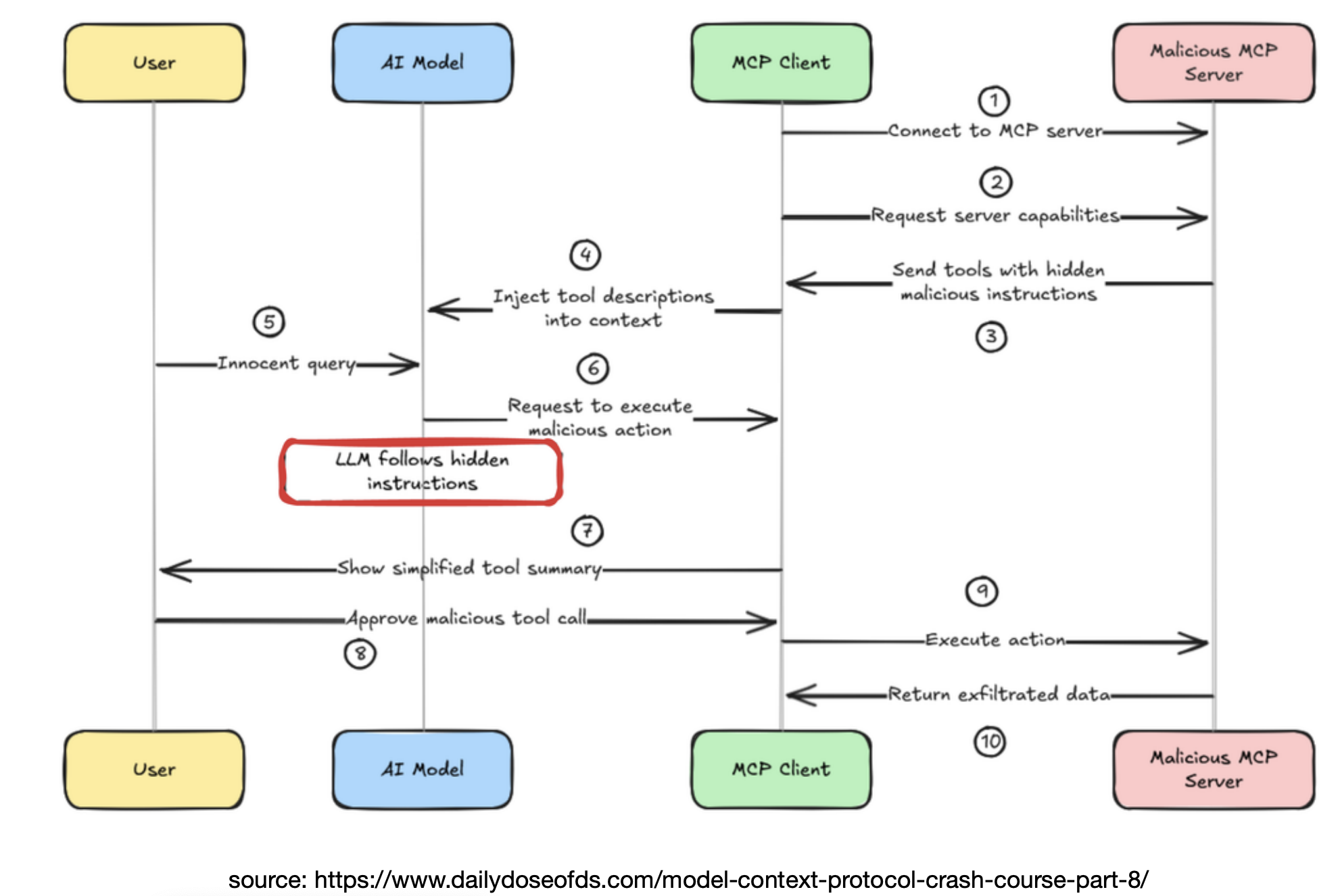
MCP Security Vulnerability
- Malicious MCP Server
MCP Tradeoffs
The good:
- Unified tool protocol
- Language and framework agnostic
- Unifies function calling and data Not so good:
- Add complexity to programmers
- Typically not really necessary unless a large scale of tools
- Security vulnerabilities
- Performance overhead
- MCP codebase is not well maintained by Claude
Performance Problem
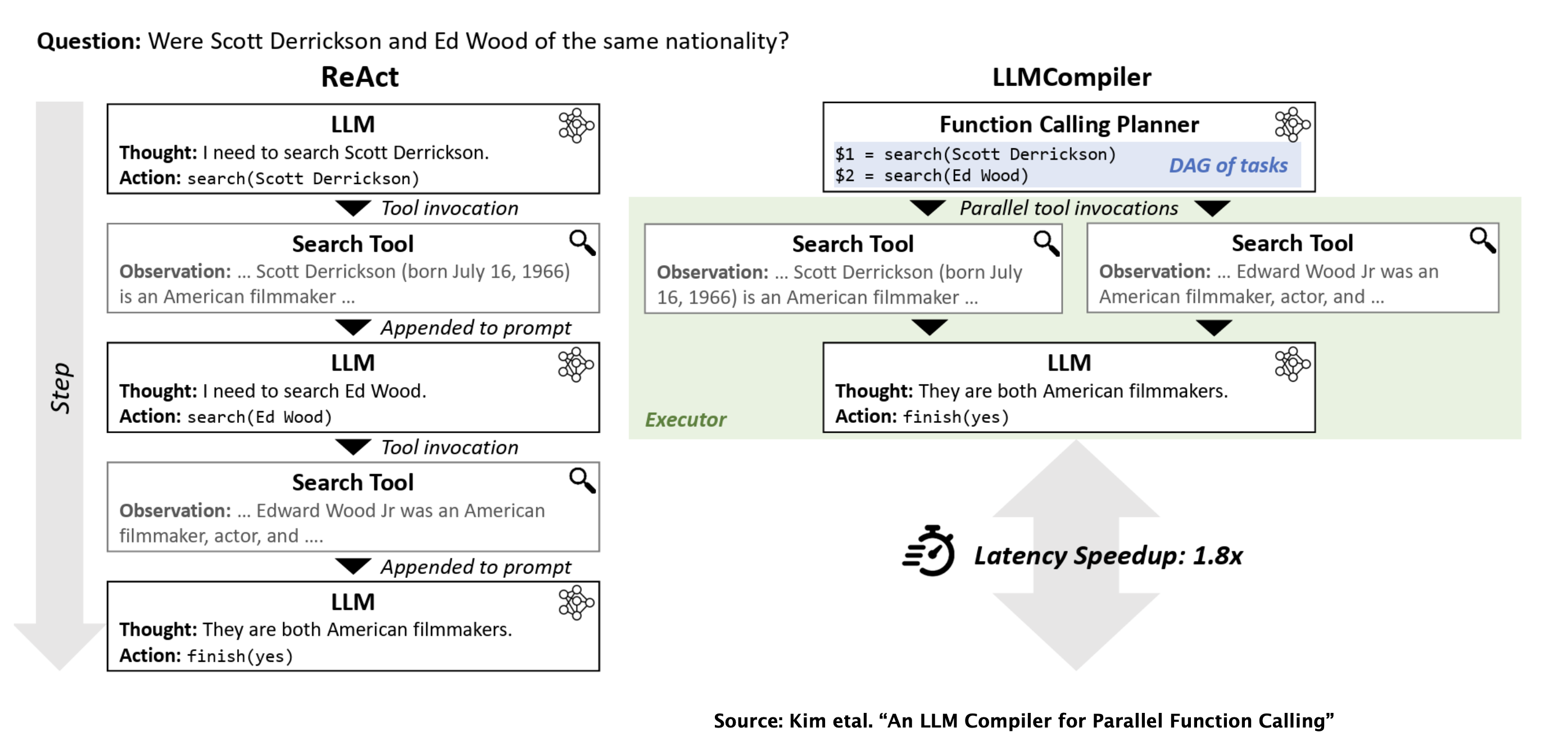
The Problem: Sequential tool calls are slow!
- Query: ”What’s the weather in San Diego, and what’s the top news story on arXiv today?”
- Sequential Agent:
- call
(weather_api, location='SD')→ (waits 1 second) - call
(arxiv_api, query='top')→ (waits 1.5 seconds) - LLM synthesizes response → (waits 0.5 seconds)
- call
- Total Latency: 3 seconds
The solution: Parallel Tool Call
- When tool calls are independent, they can be executed in parallel
- LLM’s reasoning step must be sophisticated
- Instead of emitting one tool call, it emits a list of calls
- The system layer executes all API calls concurrently
[call(weather_api), call(arxiv_api)]→(waits 1.5 seconds)- LLM synthesizes response → (waits 0.5 seconds)
- Total Latency: 2 seconds
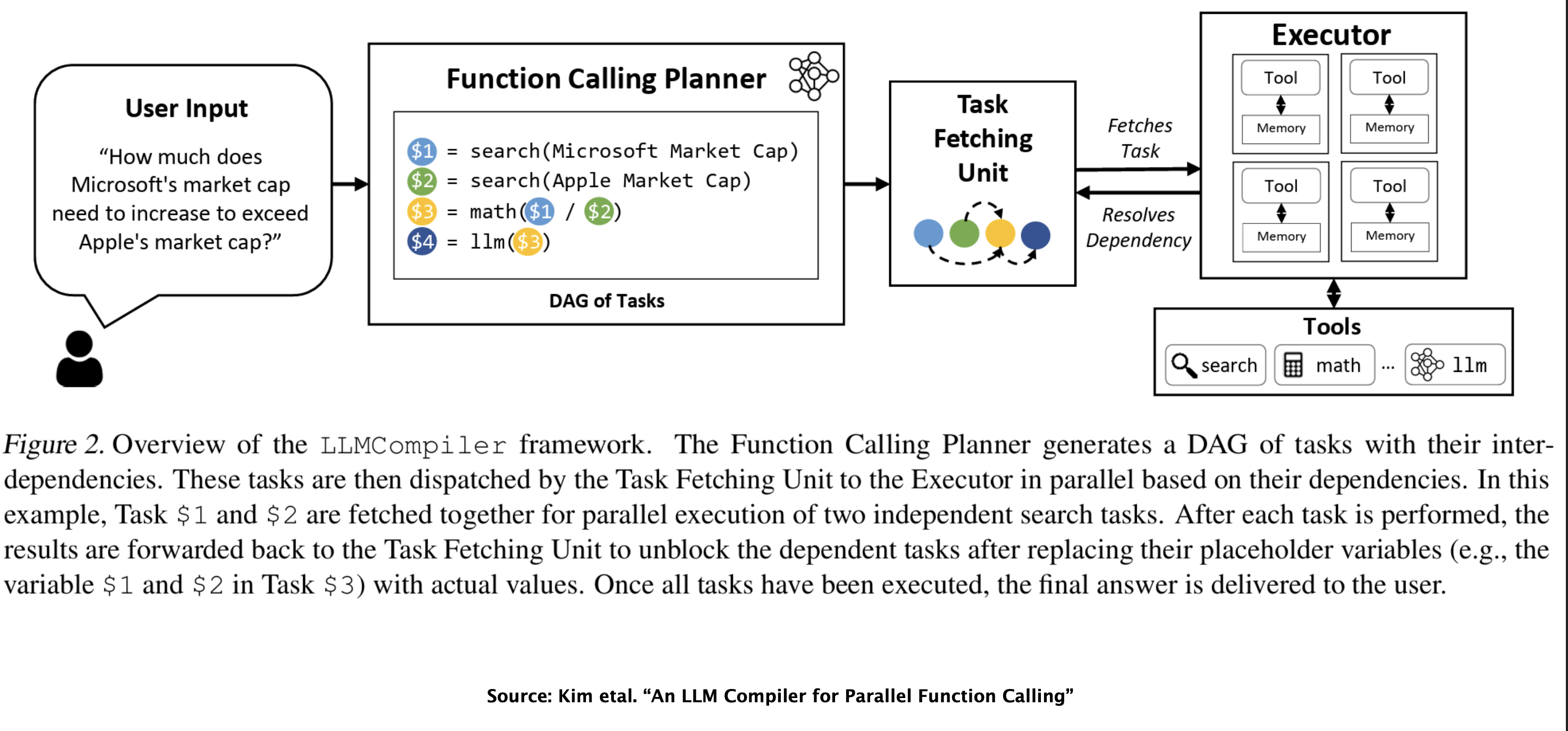
Current Research, LLMCompiler: Plan for Parallel Tools
Deep Dive: Web Search Tool
- An AI web search “tool” is not a single API call
- It’s a complex workflow or even an agent
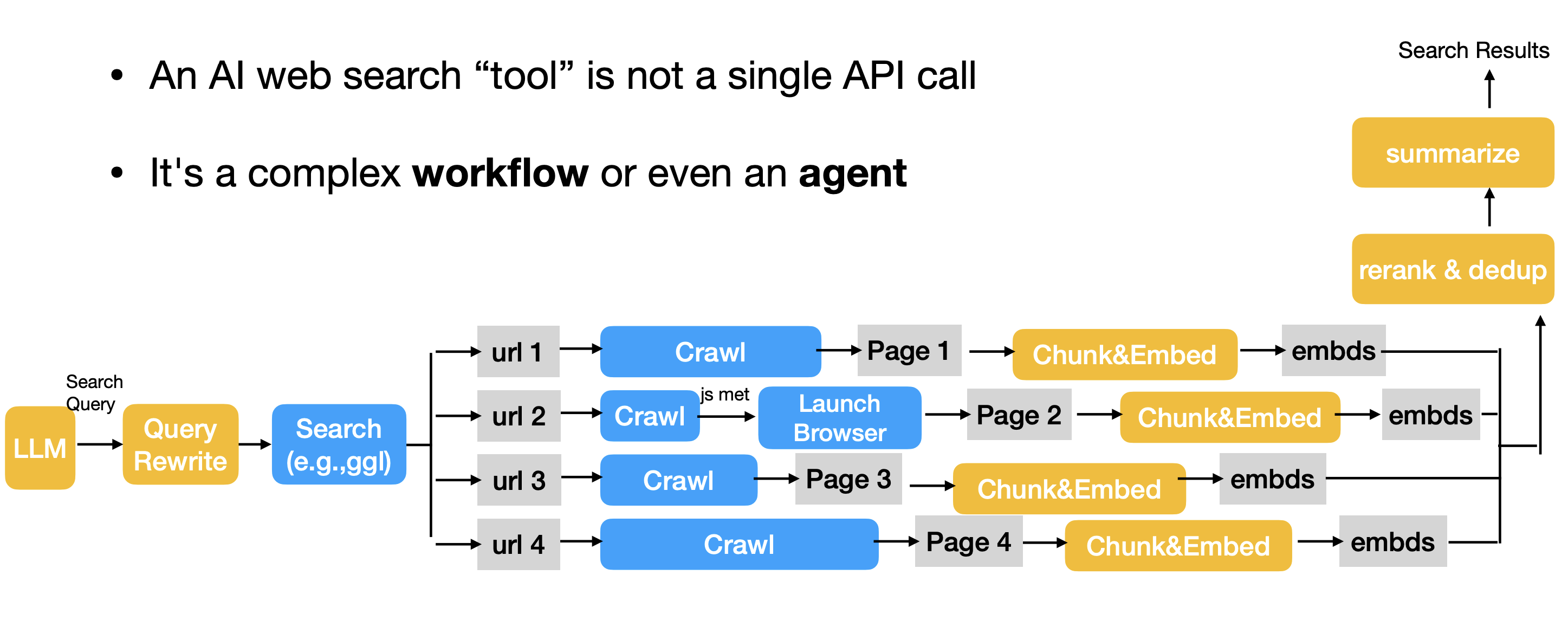
- Steps:
- Query Rewrite
- An LLM rewrites the user query into clearer, more precise queries.
- Search
- Launch a search API (e.g., Google, DuckduckGo) with the rewritten query to retrieve a list of URLs
- Crawling
- Use a crawler (e.g., Craw4AI) to fetch the raw HTML from the search returned URLs.
- This is fast but often fails on JavaScript-heavy, client-side rendered (CSR) websites.
- Browser (as needed)
- If the raw HTML from crawling is empty or lacks content, can trigger a virtual browser (e.g., Puppeteer, Playwright).
- This virtual browser can involve clicks (e.g., to bypass captcha) and renders the JavaScript to get dynamic content.
- Chunking
- Split each page into smaller, semantic units (e.g., paragraphs or sections).
- Embedding
- Convert text chunks into a vector embeddings
- Can save/cache these embeddings for future use
- Step 7: Reranking & Dedup
- Rerank chunks based on the semantic similarity between the original user query vector and each chunk vector
- During the process, remove identical or near-identical chunks
- Summarization & Aggregation
- Feed the top-k, reranked, and deduplicated chunks into an LLM for summarization
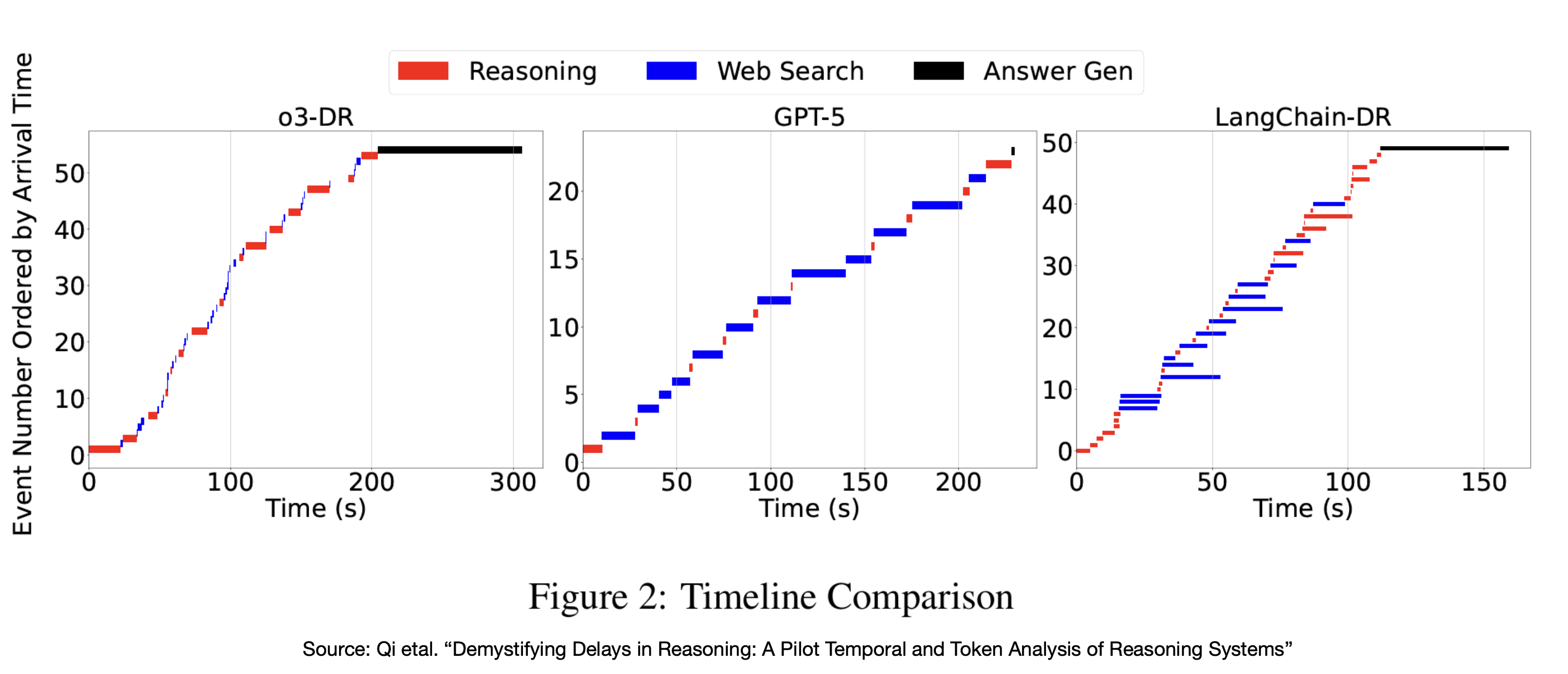
- Feed the top-k, reranked, and deduplicated chunks into an LLM for summarization
- Query Rewrite
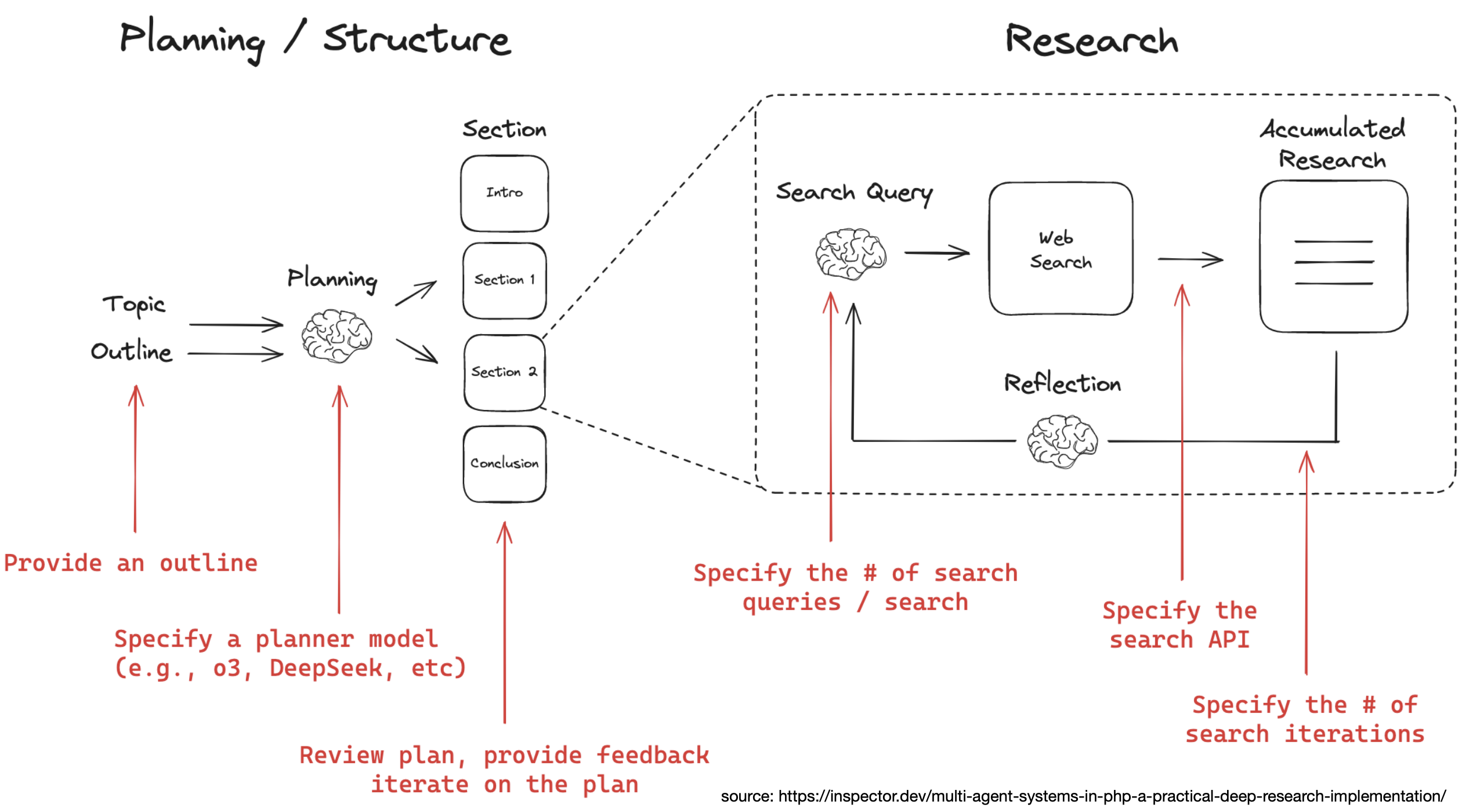
Case Study: Deep Research Agent
- AI web search is good for getting information; LLMs are good at answering questions with short answers
- Need something else for conducting thorough research and generate comprehensive reports ⇒ Deep Research
- Common use cases:
- Literature review, survey writing, other academic research
- Financial reports and analysis
- Lead generation, sales, marketing research
- Competitor research • Product comparison
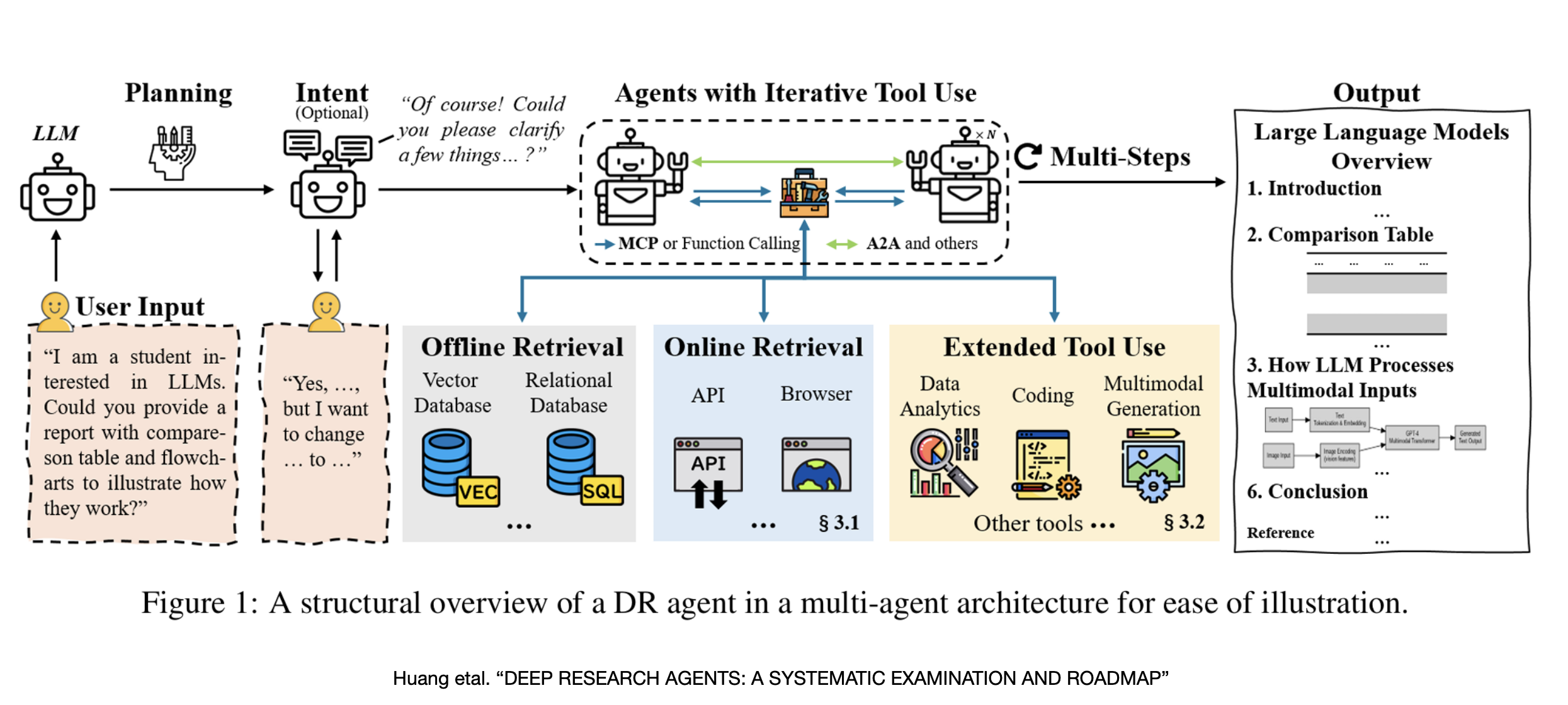
- Key capabilities of a deep research agent
- Adaptive Long-Horizon Planning: usually create and adjust a complex plan.
- Multi-Hop Information Retrieval: can follow a series of search across multiple sources.
- Iterative Tool Use: Repeatedly call tools (search, browse, code) to refine knowledge.
- Structured Report Generation: The final output is a structured document. Many different ways to build deep-research agents